环境配置

1.conda配置python3.9的环境

2.cuda和cudnn安装

3.依赖下载

cuda版本torch安装
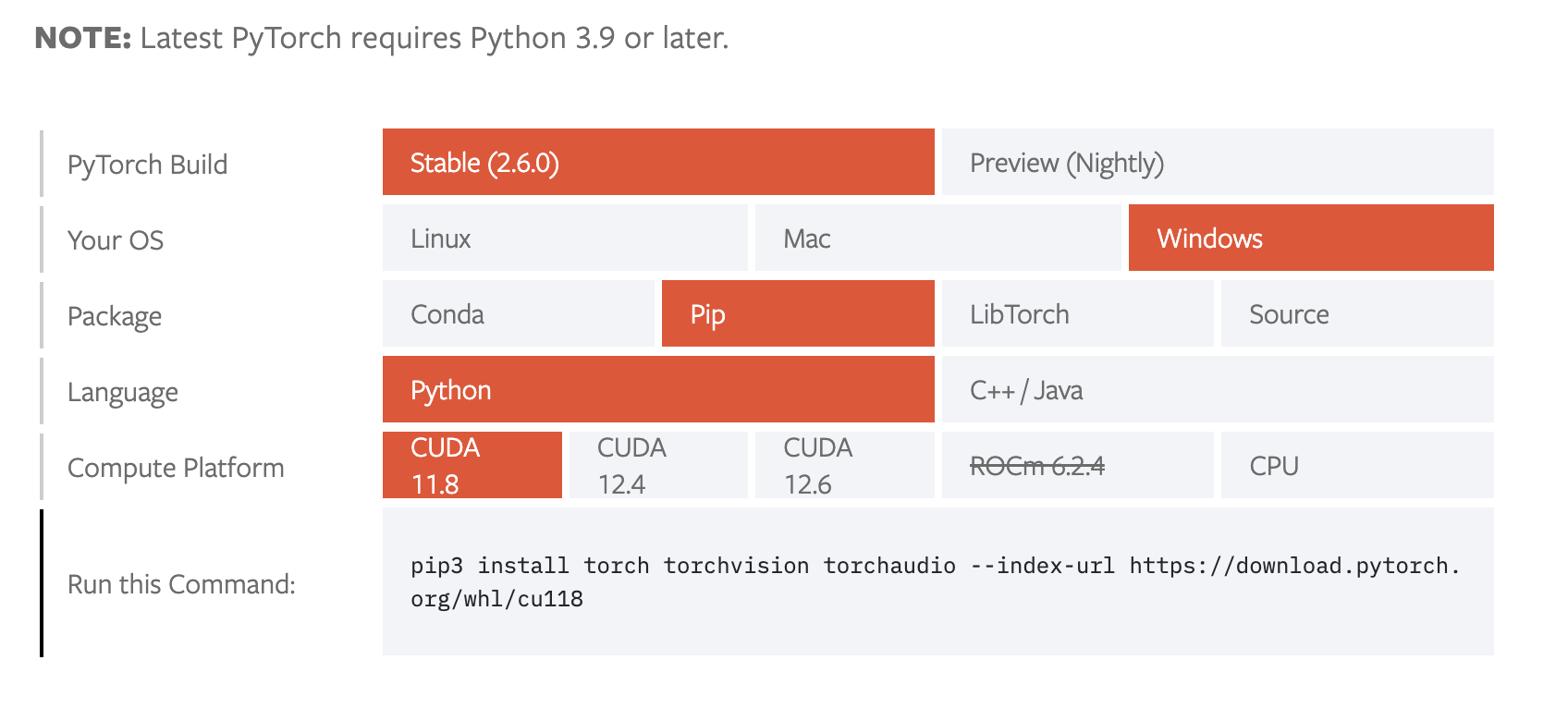
  1. https://pytorch.org/get-started/locally/ 查看需要的命令

image.png

1
pip3 install torch torchvision torchaudio --index-url https://download.pytorch.org/whl/cu118

训练

通过网络上的数据集训练

融合情感数据集 数据集

1
2
3
4
5
6
7
8
9
10
11
A merged emotions dataset was created using a highly curated subset of ExpW, FER2013 (enhanced with FER2013+), AffectNet (6 emotions), and RAF-DB in YOLO format, totaling approximately 155K samples. A YOLOv11-x model, fine-tuned on the WiderFace dataset for the bounding boxes, was used. The distribution is as follows:

TRAIN Set Class Distribution:

- Class 0 (Angry): 8511 (6.84%)
- Class 1 (Disgust): 6307 (5.07%)
- Class 2 (Fear): 4249 (3.41%)
- Class 3 (Happy): 37714 (30.30%)
- Class 4 (Neutral): 39297 (31.57%)
- Class 5 (Sad): 15809 (12.70%)
- Class 6 (Surprise): 12593 (10.12%)

通过以下链接下载
https://huggingface.co/datasets/AdamCodd/yolo-emotions/blob/main/README.md

路径结构
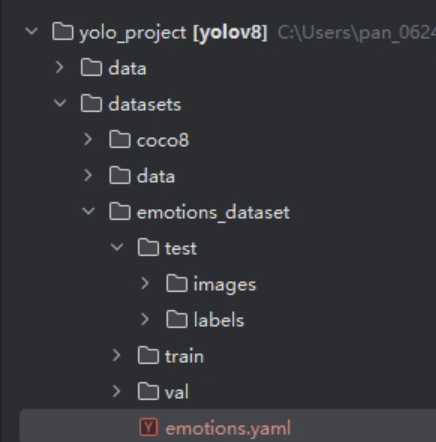
image.png|300

1
2
3
4
5
6
7
8
9
10
11
12
13
# 数据集根目录(绝对路径)
path: C:\Users\pan_0624\Documents\yolo_project\datasets\emotions_dataset

# 训练、验证和测试图像目录(相对路径)
train: train/images
val: val/images
test: test/images

# 类别数量
nc: 7

# 类别名称
names: ['Angry', 'Disgust', 'Fear', 'Happy', 'Neutral','Sad','Surprise']

训练脚本

1
2
3
4
5
6
7
8
9
10
11
12
13
14
15
16
17
18
19
20
21
22
23
24
25
26
27
28
29
30
31
32
33
from ultralytics import YOLO
import time
from datetime import datetime

def main():
# Record start time
start_time = time.time()

# Load model
model = YOLO("yolov8n.pt")

# Train
model.train(
data="datasets/emotions_dataset/emotions.yaml", # Specify the training dataset configuration file path
epochs=100, # Set the total number of training epochs
patience=10, # Set the early stopping patience value
batch=60 # Set the batch size used in each iteration
)

# Validate
model.val()

# Record end time
end_time = time.time()
elapsed_time = end_time - start_time

# Output total elapsed time and current time
current_time = datetime.now().strftime("%Y-%m-%d %H:%M:%S")
print(f"Total elapsed time: {elapsed_time:.2f} seconds")
print(f"Current time: {current_time}")

if __name__ == "__main__":
main()

中断训练继续脚本

1
2
3
4
5
6
7
8
9
10
11
12
13
14
15
16
17
18
19
20
21
22
23
24
25
26
27
28
29
30
31
32
33
34
from ultralytics import YOLO
import time
from datetime import datetime

def main():
# 记录开始时间
start_time = time.time()

# Load the partially trained model
model = YOLO("runs/detect/train/weights/last.pt") # 替换为你的 last.pt 文件路径

# Resume training
model.train(
data="datasets/emotions_dataset/emotions.yaml", # 指定训练数据的配置文件路径
epochs=100, # 设置训练的总轮数
patience=10, # 设置早停机制的耐心值
batch=64, # 设置批量大小
resume=True # 启用恢复训练
)

# Validate
model.val()

# 记录结束时间
end_time = time.time()
elapsed_time = end_time - start_time

# 输出总用时和当前时间
current_time = datetime.now().strftime("%Y-%m-%d %H:%M:%S")
print(f"Total elapsed time: {elapsed_time:.2f} seconds")
print(f"Current time: {current_time}")

if __name__ == "__main__":
main()

验证初步训练模型精确度

图片检测

1
2
3
4
5
6
7
8
9
10
11
12
13
14
15
16
17
18
19
20
21
22
23
24
25
26
27
28
29
30
31
32
33
34
35
36
37
38
39
40
41
42
43
44
45
46
47
48
49
50
51
52
53
54
import os
import cv2
from ultralytics import YOLO

def test_images(model_path, image_folder):
# 加载 YOLOv8 模型
model = YOLO(model_path)

# 获取 test 文件夹下的所有图片文件
image_files = [os.path.join(image_folder, f) for f in os.listdir(image_folder) if f.endswith(('.png', '.jpg', '.jpeg'))]

# 遍历每张图片
for image_file in image_files:
# 读取图片
img = cv2.imread(image_file)

# 使用 YOLOv8 模型进行推理
results = model(img)

# 在帧上展示结果
annotated_frame = results[0].plot() # 绘制检测结果

# 动态调整帧大小,保持原始比例且最长边为640像素
h, w = annotated_frame.shape[:2] # 获取原始帧的高度和宽度
if w > h:
new_width = 640
new_height = int(h * (640 / w))
else:
new_height = 640
new_width = int(w * (640 / h))

# 调整帧大小
resized_frame = cv2.resize(annotated_frame, (new_width, new_height), interpolation=cv2.INTER_LINEAR)

# 展示带注释的帧
cv2.imshow('YOLOv8 Detection', resized_frame)

# 等待 1 秒
if cv2.waitKey(1000) & 0xFF == ord('q'):
print("检测结束,用户退出。")
break

# 关闭所有 OpenCV 窗口
cv2.destroyAllWindows()

if __name__ == "__main__":
# 模型路径
model_path = "runs/detect/train/weights/best.pt"

# 图片文件夹路径
image_folder = "datasets/emotions_dataset/test/images"

# 调用测试函数
test_images(model_path, image_folder)

视频检测

1
2
3
4
5
6
7
8
9
10
11
12
13
14
15
16
17
18
19
20
21
22
23
24
25
26
27
28
29
30
31
32
33
34
35
36
37
38
39
40
41
42
43
44
45
46
47
48
49
50
51
52
53
54
from ultralytics import YOLO
import cv2
import numpy as np

# 加载YOLOv8模型
model = YOLO('runs/detect/train/weights/best.pt')

# 打开视频文件
cap = cv2.VideoCapture('test/shu1.mp4')

# 循环遍历视频帧
while cap.isOpened():
# 从视频读取一帧
success, frame = cap.read()
if not success:
break

# 在帧上运行YOLOv8检测
results = model.predict(frame)

# 检查是否有检测结果
if results:
# 获取框和类别信息
boxes = results[0].boxes.xyxy.cpu().numpy() # 获取xyxy格式的边界框,并转换为numpy数组
classes = results[0].boxes.cls.cpu().numpy() # 获取类别索引,并转换为numpy数组

# 在帧上展示结果
annotated_frame = results[0].plot() # 绘制检测结果

# 动态调整帧大小,保持原始比例且最长边为640像素
h, w = annotated_frame.shape[:2] # 获取原始帧的高度和宽度
if w > h:
new_width = 640
new_height = int(h * (640 / w))
else:
new_height = 640
new_width = int(w * (640 / h))

# 调整帧大小
resized_frame = cv2.resize(annotated_frame, (new_width, new_height), interpolation=cv2.INTER_LINEAR)

# 展示带注释的帧
cv2.imshow('YOLOv8 Detection', resized_frame)
else:
# 如果没有检测结果,直接展示原始帧
cv2.imshow('YOLOv8 Detection', frame)

# 如果按下'q'则退出循环
if cv2.waitKey(1) & 0xFF == ord('q'):
break

# 释放视频捕获对象并关闭显示窗口
cap.release()
cv2.destroyAllWindows()

检测结果

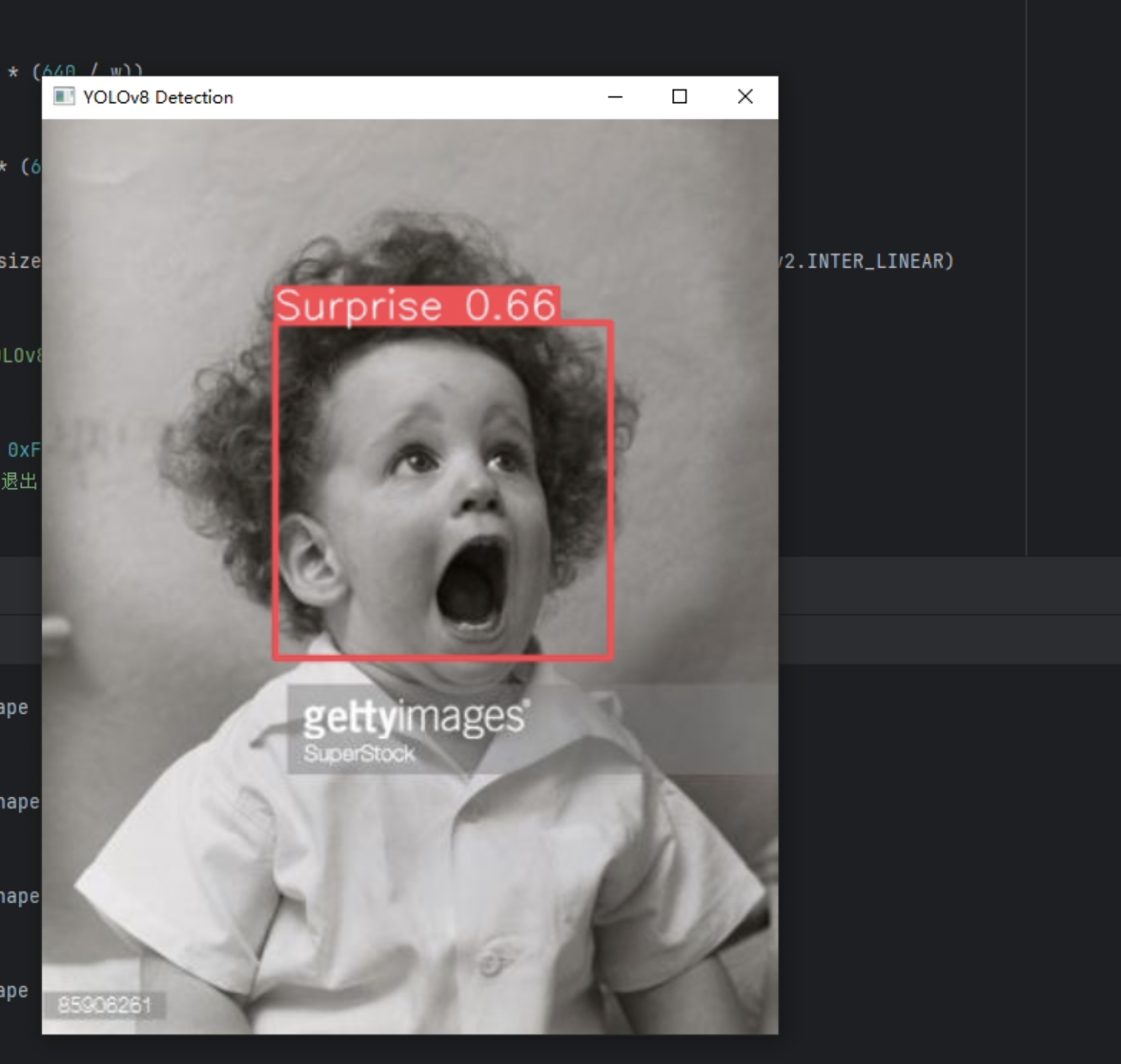
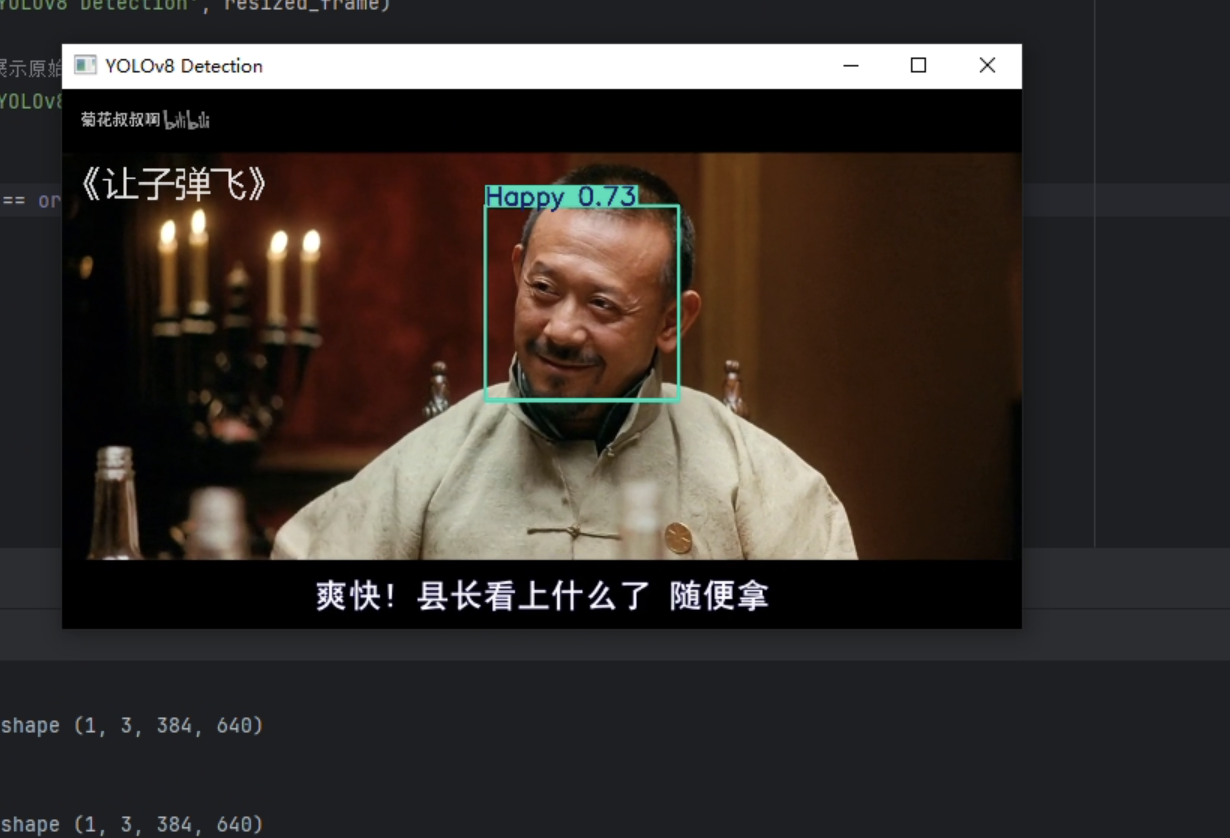
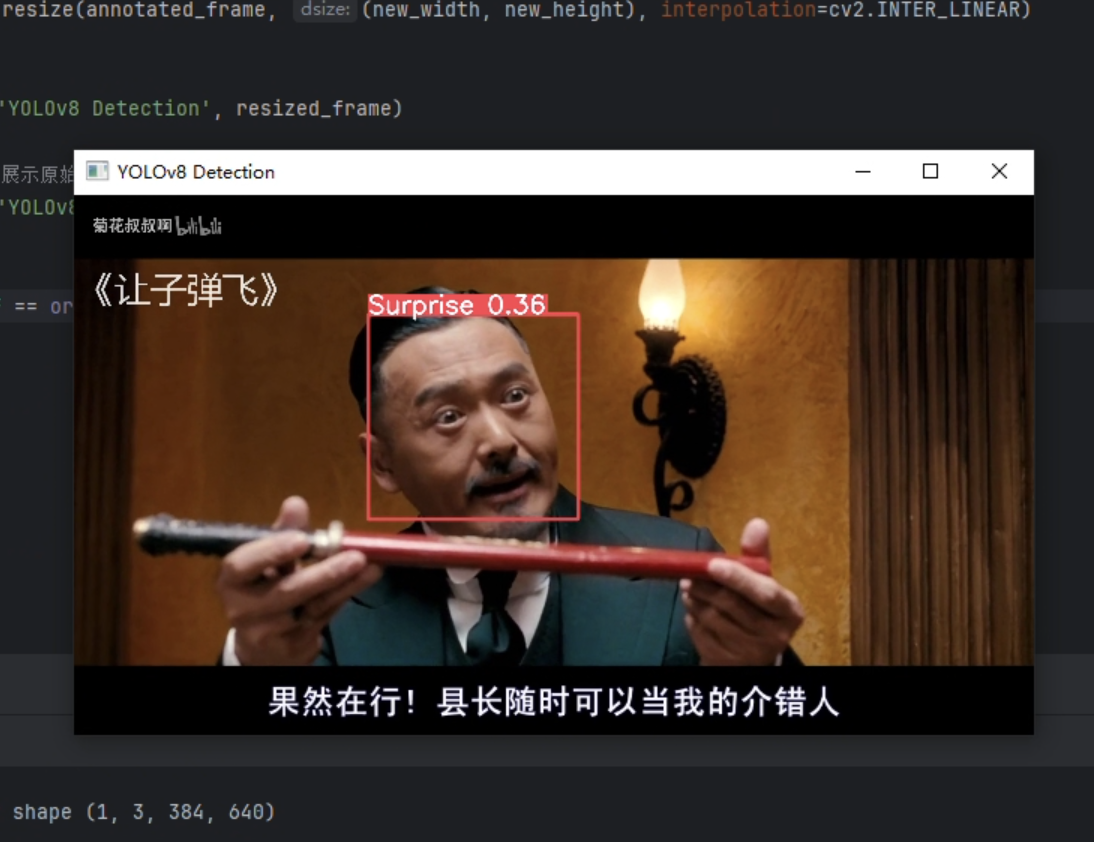
经过初步检测,对于图片的检测效果较好,但对于多对象的检测,侧脸的检测效果较差。对于视频检测只对较为明显的表情检测效果尚可。多对象的检测速度最多不超过200ms,速度较快。

图片
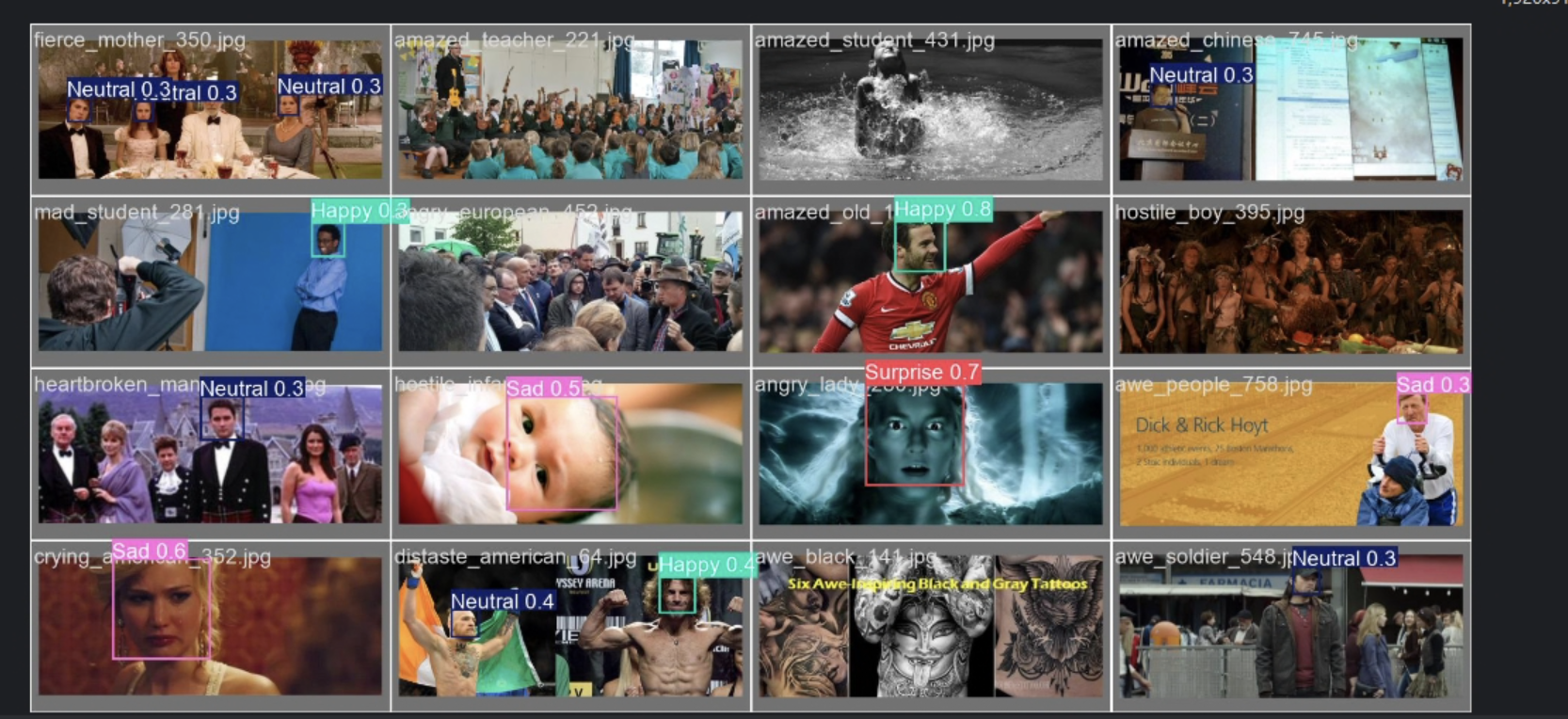
image.png

image.png|300

视频

image.png|500

image.png|500

判断可能由于数据集过大(10w+图片),训练轮次初步只设置了一百轮(耗时20h),且置信度还在上升,未触发patience early stop 机制。
下一步同步进行200轮训练与对于当前模型的初步改进算法。

改进

插入模块方法示范

添加模块方法

1
2
3
4
5
6
7
8
9
10
11
12
13
14
15
16
17
18
19
20
21
22
23
24
25
26
27
28
29
30
31
32
33
34
35
36
37
38
39
40
41
42
43
44
45
46
47
48
49
50
51
52
53
54
55
56
57
58
# example_mod.py such as GAM_Attention
import math

import numpy as np
import torch
import torch.nn as nn

__all__ = (
"GAM_Attention"
)
# 此部分用于控制在导入模块时可使用的公开类

def channel_shuffle(x, groups=2): ##shuffle channel
# RESHAPE----->transpose------->Flatten
B, C, H, W = x.size()
out = x.view(B, groups, C // groups, H, W).permute(0, 2, 1, 3, 4).contiguous()
out = out.view(B, C, H, W)
return out


class GAM_Attention(nn.Module):
def __init__(self, c1, c2, group=True, rate=4):
super(GAM_Attention, self).__init__()

self.channel_attention = nn.Sequential(
nn.Linear(c1, int(c1 / rate)),
nn.ReLU(inplace=True),
nn.Linear(int(c1 / rate), c1)
)

self.spatial_attention = nn.Sequential(

nn.Conv2d(c1, c1 // rate, kernel_size=7, padding=3, groups=rate) if group else nn.Conv2d(c1, int(c1 / rate),
kernel_size=7,
padding=3),
nn.BatchNorm2d(int(c1 / rate)),
nn.ReLU(inplace=True),
nn.Conv2d(c1 // rate, c2, kernel_size=7, padding=3, groups=rate) if group else nn.Conv2d(int(c1 / rate), c2,
kernel_size=7,
padding=3),
nn.BatchNorm2d(c2)
)


def forward(self, x):
b, c, h, w = x.shape
x_permute = x.permute(0, 2, 3, 1).view(b, -1, c)
x_att_permute = self.channel_attention(x_permute).view(b, h, w, c)
x_channel_att = x_att_permute.permute(0, 3, 1, 2)
# x_channel_att=channel_shuffle(x_channel_att,4) #last shuffle
x = x * x_channel_att

x_spatial_att = self.spatial_attention(x).sigmoid()
x_spatial_att = channel_shuffle(x_spatial_att, 4) # last shuffle
out = x * x_spatial_att
# out=channel_shuffle(out,4) #last shuffle
return out

1
2
3
4
5
cd C:\Users\pan_0624\miniconda3\envs\yolov8_project\Lib\site-packages\ultralytics\nn\modules
# newly bulid modules example_mod
nano example_mod.py
# save
cd C:\Users\pan_0624\miniconda3\envs\yolov8_project\Lib\site-packages\ultralytics\nn\modules\__init__.py # import

编辑__init__.py导入上文提到的模块,这里__init__.py实现的是对模块的二次封装,控制上层可访问的接口

1.从当前路径的py文件中导入类

1
2
from .new_mod import GAM_Attention
# 如果要新添加类,全部写入new_mod.py内再逐个导入即可

2.设置外部可访问的类名(接口),在尾行添加刚才导入的类

1
2
3
4
5
6
7
8
9
10
11
12
13
14
15
16
17
18
19
20
21
22
23
24
25
26
27
28
29
30
31
32
33
34
35
36
37
38
39
40
41
42
43
44
45
46
47
48
49
50
51
52
53
54
55
56
57
58
59
60
61
62
63
64
65
66
67
68
69
70
71
72
73
74
75
__all__ = (
"Conv",
"Conv2",
"LightConv",
"RepConv",
"DWConv",
"DWConvTranspose2d",
"ConvTranspose",
"Focus",
"GhostConv",
"ChannelAttention",
"SpatialAttention",
"CBAM",
"Concat",
"TransformerLayer",
"TransformerBlock",
"MLPBlock",
"LayerNorm2d",
"DFL",
"HGBlock",
"HGStem",
"SPP",
"SPPF",
"C1",
"C2",
"C3",
"C2f",
"C3k2",
"SCDown",
"C2fPSA",
"C2PSA",
"C2fAttn",
"C3x",
"C3TR",
"C3Ghost",
"GhostBottleneck",
"Bottleneck",
"BottleneckCSP",
"Proto",
"Detect",
"Segment",
"Pose",
"Classify",
"TransformerEncoderLayer",
"RepC3",
"RTDETRDecoder",
"AIFI",
"DeformableTransformerDecoder",
"DeformableTransformerDecoderLayer",
"MSDeformAttn",
"MLP",
"ResNetLayer",
"OBB",
"WorldDetect",
"v10Detect",
"ImagePoolingAttn",
"ContrastiveHead",
"BNContrastiveHead",
"RepNCSPELAN4",
"ADown",
"SPPELAN",
"CBFuse",
"CBLinear",
"AConv",
"ELAN1",
"RepVGGDW",
"CIB",
"C2fCIB",
"Attention",
"PSA",
"TorchVision",
"Index",
"GAM_Attention" #添加的新类
)

编辑task.py

1
2
3
4
5
6
7
8
nano tasks.py
# 修改import部分,导入example_mod模块
from ultralytics.nn.modules import (
*,
*,
GAM_Attention,
)
# 在尾部添加模块

编辑关键函数parse_model(解析 YOLOv8 的模型配置文件,生成pytorch类型的模型结构)

1
2
3
4
5
6
# 添加GAM_Attention的通道数调整部分
elif m is GAM_Attention:
c1, c2 = ch[f], args[0]
if c2 != nc: # if c2 not equal to number of classes (i.e. for Classify() output)
c2 = make_divisible(min(c2, max_channels) * width, 8)
args = [c1, c2, *args[1:]]

制作客制化配置文件custom_yolov8.yaml

1
2
3
# 导入模块后修改客制化yolov8.yaml配置文件
nano C:\Users\pan_0624\miniconda3\envs\yolov8_project\Lib\site-packages\ultralytics\cfg\models\v8\custom_yolov8.yaml
# 将模块加入backbone部分,即特征提取部分,补充参数到backbone
  • Backbone 负责从输入图像中提取多尺度的特征图,这些特征图包含了图像的边缘、纹理、形状等信息。
  • Head 利用这些特征图进行目标检测,输出每个目标的边界框、类别和置信度分数。
1
2
3
4
5
6
7
8
9
10
11
12
13
14
15
16
17
18
19
20
21
22
23
24
25
26
27
28
29
30
31
32
33
34
35
36
37
38
39
40
41
42
43
44
45
46
47
48
49
50
51
52
53
54
55
56
57
# custom_yolov8.yaml
# backbone部分逐层(逐行)添加模块,并且完善参数
# 参数从使用的配置文件中提取或者根据上下文设置


# Ultralytics 🚀 AGPL-3.0 License - https://ultralytics.com/license

# Ultralytics YOLOv8 object detection model with P3/8 - P5/32 outputs
# Model docs: https://docs.ultralytics.com/models/yolov8
# Task docs: https://docs.ultralytics.com/tasks/detect

# Parameters
nc: 80 # number of classes
scales: # model compound scaling constants, i.e. 'model=yolov8n.yaml' will call yolov8.yaml with scale 'n'
# [depth, width, max_channels]
n: [0.33, 0.25, 1024] # YOLOv8n summary: 225 layers, 3157200 parameters, 3157184 gradients, 8.9 GFLOPs
s: [0.33, 0.50, 1024] # YOLOv8s summary: 225 layers, 11166560 parameters, 11166544 gradients, 28.8 GFLOPs
m: [0.67, 0.75, 768] # YOLOv8m summary: 295 layers, 25902640 parameters, 25902624 gradients, 79.3 GFLOPs
l: [1.00, 1.00, 512] # YOLOv8l summary: 365 layers, 43691520 parameters, 43691504 gradients, 165.7 GFLOPs
x: [1.00, 1.25, 512] # YOLOv8x summary: 365 layers, 68229648 parameters, 68229632 gradients, 258.5 GFLOPs

# YOLOv8.0n backbone
backbone:
# [from, repeats, module, args]
- [-1, 1, Conv, [64, 3, 2]] # 0-P1/2
- [-1, 1, Conv, [128, 3, 2]] # 1-P2/4
- [-1, 3, C2f, [128, True]]
- [-1, 1, Conv, [256, 3, 2]] # 3-P3/8
- [-1, 6, C2f, [256, True]]
- [-1, 1, Conv, [512, 3, 2]] # 5-P4/16
- [-1, 6, C2f, [512, True]]
- [-1, 1, Conv, [1024, 3, 2]] # 7-P5/32
- [-1, 3, C2f, [1024, True]]
- [-1, 3, GAM_Attention, [1024]] #在这里添加需要注意后面调用的层需要做逐层的修改
- [-1, 1, SPPF, [1024, 5]] # 9->10

# YOLOv8.0n head
head:
- [-1, 1, nn.Upsample, [None, 2, "nearest"]]
- [[-1, 6], 1, Concat, [1]] # cat backbone P4
- [-1, 3, C2f, [512]] # 12->13

- [-1, 1, nn.Upsample, [None, 2, "nearest"]]
- [[-1, 4], 1, Concat, [1]] # cat backbone P3
- [-1, 3, C2f, [256]] # 15->16 (P3/8-small)

- [-1, 1, Conv, [256, 3, 2]]
- [[-1, 13], 1, Concat, [1]] # cat head P4
- [-1, 3, C2f, [512]] # 18->19 (P4/16-medium)

- [-1, 1, Conv, [512, 3, 2]]
- [[-1, 10], 1, Concat, [1]] # cat head P5
- [-1, 3, C2f, [1024]] # 21->22 (P5/32-large)

- [[16, 19, 22], 1, Detect, [nc]] # Detect(P3, P4, P5)


修改train.py

1
2
3
4
5
6
7
8
9
10
11
12
13
14
15
16
17
18
19
20
21
22
23
24
25
26
27
28
29
30
31
32
33
34
35
36
37
38
39
40
41
from ultralytics import YOLO
import time
from datetime import datetime

def main():
# Record start time
start_time = time.time()

# # model = YOLO("custom-yolov8.yaml")
model = YOLO("custom-yolov8.yaml",verbose=True) # use custom path to yolov8.yaml (which name do not have _ )
# 添加verbose=True参数用于打印模块加载信息,测试新添加模块是否正确导入

# model = YOLO("yolov8.yaml")
# model = YOLO("yolov8.yaml",verbose=True) # use custom path to yolov8.yaml (which name do not have _ )

# # Load model
# model = YOLO("yolov8n.pt",verbose=True) 需要注意不能再使用预训练模型,会将修改过的模块以及配置文件覆盖

# Train
model.train(
data="datasets/expression_detection/data.yaml", # Specify the training dataset configuration file path
epochs=200, # Set the total number of training epochs
patience=30, # Set the early stopping patience value
batch=60, # Set the batch size used in each iteration , usage
name='default_yolov8.yaml_used1' # trained folder name
)

# Validate
model.val()

# Record end time
end_time = time.time()
elapsed_time = end_time - start_time

# Output total elapsed time and current time
current_time = datetime.now().strftime("%Y-%m-%d %H:%M:%S")
print(f"Total elapsed time: {elapsed_time:.2f} seconds")
print(f"Current time: {current_time}")

if __name__ == "__main__":
main()

训练后重新检查置信度和F1-Confindence Curve(综合置信度曲线),多次变换位置,找到正提升最大层数,固定层数,尝试添加更多模块。

评估模型效果

模块一:GAM_Attention

上文示范使用的就是GAM_Attention模块,接下来逐步切换模块所放置的层,测试模块最终效果

插入backbone第九层

1
2
3
4
5
6
7
8
9
10
11
12
13
14
15
16
17
18
19
20
21
22
23
24
25
26
27
28
29
30
31
32
33
34
35
36
37
38
39
40
41
42
43
44
45
46
47
48
49
50
51
# Ultralytics 🚀 AGPL-3.0 License - https://ultralytics.com/license

# Ultralytics YOLOv8 object detection model with P3/8 - P5/32 outputs
# Model docs: https://docs.ultralytics.com/models/yolov8
# Task docs: https://docs.ultralytics.com/tasks/detect

# Parameters
nc: 80 # number of classes
scales: # model compound scaling constants, i.e. 'model=yolov8n.yaml' will call yolov8.yaml with scale 'n'
# [depth, width, max_channels]
n: [0.33, 0.25, 1024] # YOLOv8n summary: 225 layers, 3157200 parameters, 3157184 gradients, 8.9 GFLOPs
s: [0.33, 0.50, 1024] # YOLOv8s summary: 225 layers, 11166560 parameters, 11166544 gradients, 28.8 GFLOPs
m: [0.67, 0.75, 768] # YOLOv8m summary: 295 layers, 25902640 parameters, 25902624 gradients, 79.3 GFLOPs
l: [1.00, 1.00, 512] # YOLOv8l summary: 365 layers, 43691520 parameters, 43691504 gradients, 165.7 GFLOPs
x: [1.00, 1.25, 512] # YOLOv8x summary: 365 layers, 68229648 parameters, 68229632 gradients, 258.5 GFLOPs

# YOLOv8.0n backbone
backbone:
# [from, repeats, module, args]
- [-1, 1, Conv, [64, 3, 2]] # 0-P1/2
- [-1, 1, Conv, [128, 3, 2]] # 1-P2/4
- [-1, 3, C2f, [128, True]]
- [-1, 1, Conv, [256, 3, 2]] # 3-P3/8
- [-1, 6, C2f, [256, True]]
- [-1, 1, Conv, [512, 3, 2]] # 5-P4/16
- [-1, 6, C2f, [512, True]]
- [-1, 1, Conv, [1024, 3, 2]] # 7-P5/32
- [-1, 3, C2f, [1024, True]]
- [-1, 3, GAM_Attention, [1024]]
- [-1, 1, SPPF, [1024, 5]] # 9->10

# YOLOv8.0n head
head:
- [-1, 1, nn.Upsample, [None, 2, "nearest"]]
- [[-1, 6], 1, Concat, [1]] # cat backbone P4
- [-1, 3, C2f, [512]] # 12->13

- [-1, 1, nn.Upsample, [None, 2, "nearest"]]
- [[-1, 4], 1, Concat, [1]] # cat backbone P3
- [-1, 3, C2f, [256]] # 15->16 (P3/8-small)

- [-1, 1, Conv, [256, 3, 2]]
- [[-1, 13], 1, Concat, [1]] # cat head P4
- [-1, 3, C2f, [512]] # 18->19 (P4/16-medium)

- [-1, 1, Conv, [512, 3, 2]]
- [[-1, 10], 1, Concat, [1]] # cat head P5
- [-1, 3, C2f, [1024]] # 21->22 (P5/32-large)

- [[16, 19, 22], 1, Detect, [nc]] # Detect(P3, P4, P5)

查看模型效果

查看PR图发现mAP没有明显提升甚至下降了

模块二 Swin Transformer 无效

模块三 Down_wt卷积 有效提升10%

  1. 需要关闭amp-混合精度训练
  2. batch30和batch16下都有提升
  3. 配置文件 yolov8-Down_WT.yaml
  4. 结果保存在yolov8-Down_WT.yaml_used_no_amp_batch30文件夹及对应验证文件夹下
  5. epochs=200 amp = False batch=30/batch=16
  6. 参考csdn https://blog.csdn.net/qq_64693987/article/details/143125567

模块4